![AtomLearningLogo_White.svg]](https://resources.atomlearning.co.uk/hubfs/AtomLearningLogo_White.svg)
Every child finds some topics more difficult than others, and that's a normal part of learning, not a sign of falling behind. The key is knowing exactly where the difficulty lies, so your child's practice time is spent where it counts. Atom Home is built to help you do exactly that.
Spotting where the difficulty liesAs your child works through adaptive questions, the platform continuously tracks their performance across every topic and skill area, flagging where they're excelling and where a topic is proving more challenging.
Instead of guessing which subjects need attention, you can open your child's Track page to see:
-
- Whether your child is currently on track for their target school
- A subject-by-subject status of "on track" or "needs practice"
- A detailed breakdown of strengths and weaknesses within each subject, down to specific question types
This turns a vague sense that "maths feels difficult" into something concrete you can act on together.
Turning weakness into strengthOnce you've spotted an area of weakness, Atom Home makes it simple to target it directly. From the Track page, you can:
- Assign focused extra practice actiities on the exact topics your child finds difficult
- Let the adaptive algorithm adjust the difficulty of questions as your child improves, so they're always working at the right level
- Avoid them getting stuck repeating what they've already mastered, or feeling overwhelmed by content that's still too challenging
Checking in on progress regularly, even just once a week, helps you have calm, informed conversations with your child about what they find difficult, and celebrate the moments when a previous weakness becomes a strength.
Setting an extra practice for your child.
-
Login to your account and click the profile symbol in the top right hand corner.
- Select Set a practice, which is the first option from the drop down list.
- On the Set a practice page, you can set a practice for your child in the topics they’re finding challenging.
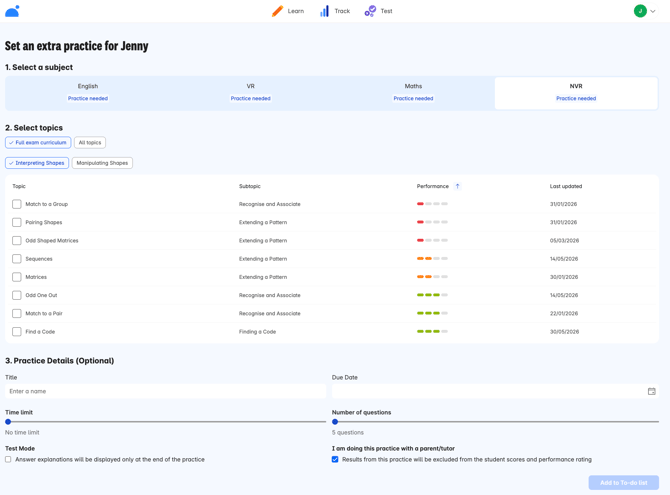
When setting extra practices for your child, we recommend:
- Sorting by the performance column to see which topics would benefit most from extra practice.
- Setting one or two extra practices per week.
- Focusing on one topic at a time per practice.
- Setting between 10 and 15 questions per practice.
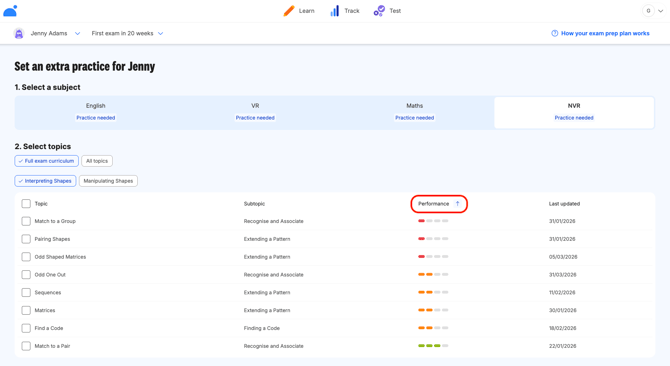
In the final months before your child’s exams, we recommend:
- Setting three to four extra practices per week.
- Aiming for every topic's performance to be showing green before exam day.