![AtomLearningLogo_White.svg]](https://resources.atomlearning.co.uk/hubfs/AtomLearningLogo_White.svg)
Because you signed up for Atom in a web browser, we'd recommend managing your account there too.
- Sign into your Atom Home account
- Select 'go to My Settings.'
- If you're already signed in to the platform, select your profile icon on the top right-hand corner, select 'My settings,' and enter your parent password.
- If you have more than one child on your account, select the child whose plan you want to change.
- Under Student settings, select 'Child's subscription'.
- Select Change plan and follow the on-screen steps.
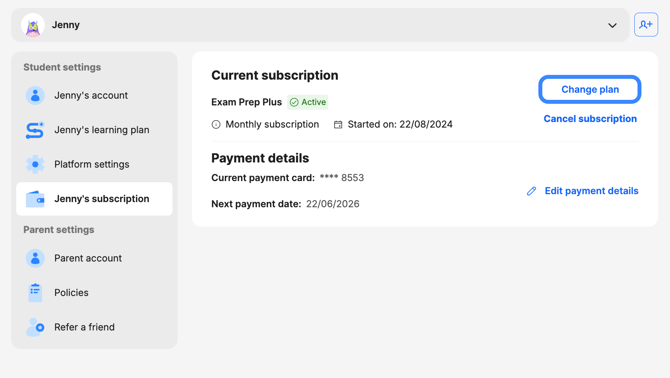
Your subscription will be changed at the end of your current billing period.
Please note: downgrades are only available for customers on a monthly rolling plan. If you're on an annual plan, you will need to wait until the end of your term to downgrade.
ℹ️ To manage your plan, please make sure you’re signed in with the main account holder email (the one you used when you first subscribed). Because you signed up for Atom in a web browser, we'd recommend managing your account there too.
If you would like any support with switching your subscription, please get in touch with us via email at support@atomlearning.co.uk.