![AtomLearningLogo_White.svg]](https://resources.atomlearning.co.uk/hubfs/AtomLearningLogo_White.svg)
To link your child's Atom Home and Atom School accounts together, please follow the instructions below:
1. Sign in to Atom Home using your email address and password.
2. Click on 'Settings'
3. Click on the name of your child whose accounts you want to link, then select 'Link a School account'

4. Enter the username of the account you want to link, then press 'continue'.
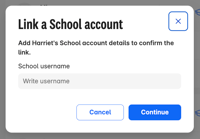
Your child will now be able to see all their work in one place!
If you need any support, please get in touch with us via email at support@atomlearning.co.uk.