![AtomLearningLogo_White.svg]](https://resources.atomlearning.co.uk/hubfs/AtomLearningLogo_White.svg)
How to track your child's progress using performance ratings
On the Track page of your Atom Home account, you can view your child's performance in each topic of their exam prep plan. The performance column uses a colour scale from red through to green, giving you a simple, at-a-glance picture of how confidently your child is working in each topic.
What determines performance?
Two factors contribute to your child's performance:
- Accuracy: The % of questions answered correctly
- Difficulty: The level of difficulty of the questions your child is seeing
📈 As your child answers questions correctly and consistently, the platform will adapt by increasing the difficulty, and their performance will rise to reflect their progress.
📉 If your child finds a topic challenging, the platform will adapt by giving easier questions to help build their confidence, and their performance will reflect this adjustment.
For each topic, performance is based on the most recent 20 questions your child has answered across the learning islands, practices, and mock tests.
👉 Performance is updated every 15 minutes to reflect new questions answered, providing an up-to-date picture of your child's progress.
Understanding the performance scale
The performance scale shows your child's current level of confidence in each topic, based on how accurately they are answering questions and how difficult those questions are.
As your child answers questions correctly and consistently, the platform will increase the difficulty of the questions. When they continue to answer those more challenging questions correctly, you will see the bars begin to fill over time. The more bars filled, the more confidently your child is working at a higher level in that topic.
Three or four green bars indicate that your child is consistently answering questions at a high level of difficulty. This indicates that the topic is an area of strength.
Topics with fewer bars filled that are a red or amber colour are areas where there is still room to grow, and ones worth focusing on in your child's practice sessions.
Topics showing no data are those your child has yet to work on in Atom.
💡 Tip: Finding the topics to focus on
To quickly identify where your child would benefit from more practice, head to the relevant subject and select Full Exam Curriculum to see all topics in one view. From there, you can sort by the Performance column to bring the topics most in need of practice to the top, making it easy to see at a glance where to focus your child's next practice session.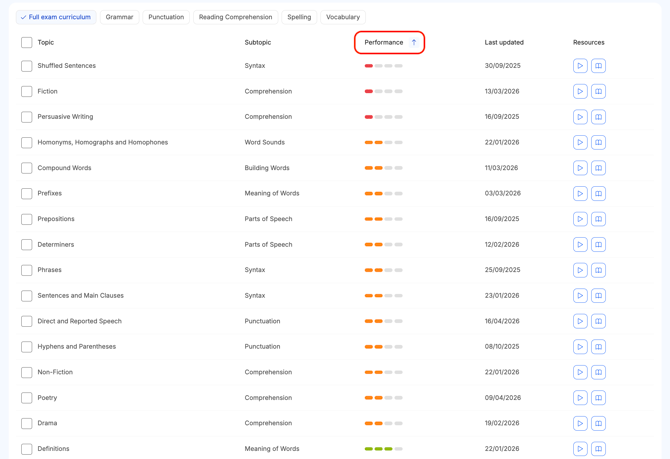
When will my child receive a performance rating?
Once they answer a minimum of 8 questions, they will receive their first performance rating in that topic.
How does this relate to the performance comparison graph?
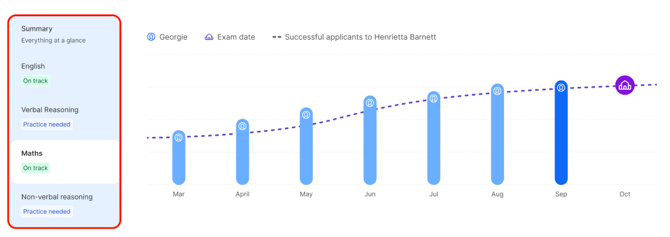
As well as showing how your child is performing in each individual topic, the Track page also includes a performance comparison graph. This gives you a broader view of how your child's overall performance compares to that of successful applicants at their target school, so you can see how they are measuring up alongside their progress through the curriculum.
Each subject shows one of two ratings:
- On track means your child's performance is at or above the level of students who previously gained a place at their target school.
- Practice needed means your child's performance is currently below that level. Keeping up consistent practice will help them reach the benchmark.